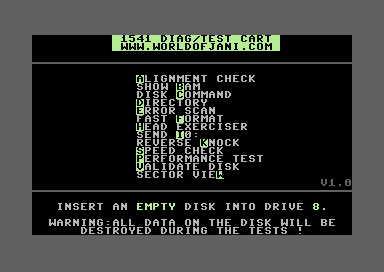
So here's the catch 22. You've got a 1541 disk drive that's acting up. So you need to load up some diagnostic software to run some tests. But, how can you load up the diagnostic software without using your 1541 drive, or the serial bus that it's currently sitting on?
This is the reason that Jani, whose blog I periodically link to worldofjani.com, decided to sit down and create the 1541 diagnostic cartridge. It's a software package that fits and runs from a standard 8K rom. The software has been given some beautiful and professional treatment. It comes in a standard cartridge case, with a colorful label. The cartridge is packaged in a professional looking box that will look totally badass on the shelf with all your other cool retro products, and in the box is a colorful printed manual.
You can read more about it on his post about the cartridge here.
The cartridge can also be purchased from the Protovision store.
The program's interface consists of a simple menu. Each entry has one letter highlighted, the menu entries are listed in alphabetical order by their highlighted letter. Press the letter to select the function and follow the instructions.
Ordering the cartridge will help support Jani, and the resellers, plus you get it in a nice cartridge with professional box and printed manual. However, Jani has also provided the .crt rom image as a free digital download from his website.
The CRT rom image can be used with an EasyFlash cartridge, mounted with a 1541 Ultimate II+, or burned to a physical EPROM and inserted into one of the many commercially available ROM cartridges. Checkout these other products found throughout the Buyer's Guide.